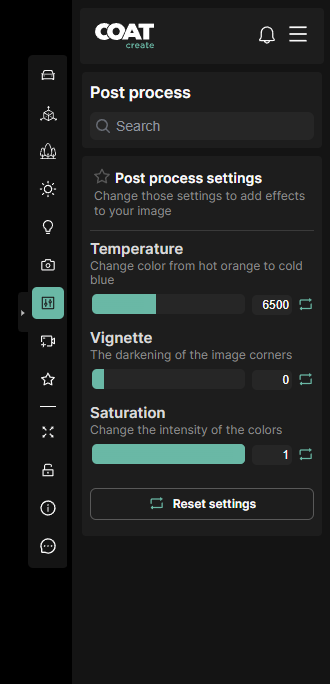
Post Process settings
-
Temperature - Warms or cools the image based off the kelvin scale, use this to correct for sunlight color.
-
Vignette - Darken the edges of the image corners.
-
Saturation - Reduce saturation of color interactively all the way down to black and white.
Open Color IO

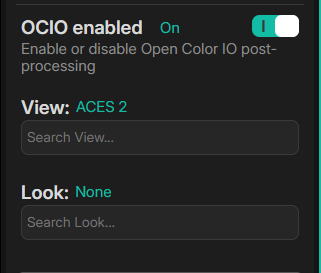
Open Color IO, also known as OCIO, is the industry standard for implementing color management. This allows COATcreate to use ACES color settings. Aces 2 is now standard in COAT.
-
OCIO enabled - Toggle on and off OCIO settings. On will be the new default moving forward. Any previous states and renders will use off to match previous working states.
-
View - The output display transform from the linear rendering space to view on your display/
-
Look - Post process styles that can be applied. This will be visible in streaming and in the final render.
Color Grading
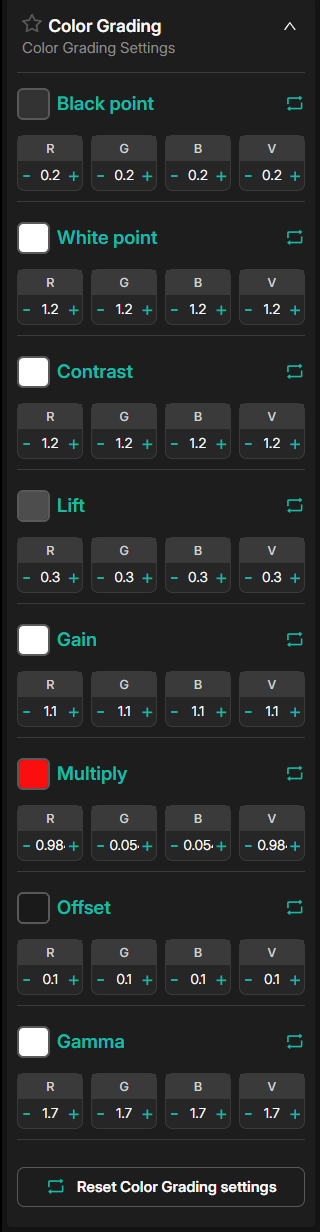
Post process the overall color of the image. Small adjustments can help improve images not possible with lighting or camera effects. Color Grading values are in floating point. This allows for values over 1.0.
-
Black Point - Defines the darkest value, anything darker will be clipped to black
-
White Point - Defines the brightest value, anything brighter will be white.
-
Contrast - Higher values increase the contrast of darks/lights and colors.
-
Lift - Raise all lower color values.
-
Gain - Adjusts the overall brightness of the image.
-
Multiply - All color values multiplied by value.
-
Offset - Shift all color values
-
Gamma - Adjust the mid tone value.